Your logo may already be copyrighted, and it may also be impossible to register. Both can be true. Copyright starts the moment you create original artwork, but the US Copyright Office turns down logos that are mostly a name in a nice font with a simple shape next to it.
So if you're asking "how do I copyright a logo," the honest answer starts with a different question: is there enough art in it to protect? This guide walks through that check, the five steps to register and what it costs. On November 19, 2026, I also put the Copyright Office's fees next to the USPTO's in one table, to show when a trademark is the better tool for the job. One date to know: the Copyright Office says its fees change on January 5, 2027.
This is a practical walkthrough for US filers, not legal advice. If a lot of money rides on your brand, an intellectual property attorney is worth talking to.
How Do I Copyright a Logo?
You copyright a logo in the US by registering it with the US Copyright Office through its online system. You check that the logo has original artwork beyond words and basic shapes, confirm you own the rights, pick the Single ($45) or Standard ($65) application, upload the file and pay. Copyright itself exists from creation, so registration is optional.
That last point trips people up. According to the Copyright Office's FAQ, "Your work is under copyright protection the moment it is created and fixed in a tangible form." Registration doesn't create the copyright. It puts your claim on the public record, and you need it before you can sue anyone over a US work.
Copyright vs Trademark for a Logo
Copyright protects your logo as a piece of art. A trademark protects it as a sign of your business. They answer different questions, and most businesses that want to stop copycats end up needing the trademark more.
To compare them, I built this table on November 19, 2026, putting the two offices' fee pages side by side. It draws on the Copyright Office's fee page, its overview of copyright and the USPTO's fee page:
| Copyright | Trademark | |
|---|---|---|
| What it protects | The original artwork in the logo | The logo as a source identifier for your goods or services |
| Protects your business name or slogan? | No. Names, slogans and short phrases are excluded | Yes, if they identify your business |
| When rights start | When the artwork is created | When you start using it in business |
| Registration fee | $45 (Single) or $65 (Standard) online, fees changing January 5, 2027 | $350 per class of goods or services |
| How long it lasts | Life of the author plus 70 years, or 95/120 years for a work made for hire | As long as you keep using it and file the maintenance paperwork |
| Who it stops | People copying your artwork | Competitors using a confusingly similar mark in related markets |
The row that matters most for a business owner is the second one. The Copyright Office says plainly that "Copyright does not protect names, titles, slogans, or short phrases" (Copyright Office FAQ). If your logo is your business name in a typeface, copyright protects very little of it. The walkthrough on how to trademark a logo covers the route that does protect a name.
Before You Start
Get these ready before you open the application:
- The final logo file. Register the finished design, not a draft. If you're still working on it, this guide to drawing a logo covers the sketch-to-vector part.
- A clean digital copy. You'll upload the logo as your deposit. A plain export works, and a transparent PNG is fine as a source file.
- The creator's details. Who made it: you, an employee or a freelancer.
- Proof of ownership if you didn't make it. A signed agreement that transfers the copyright to you or your company.
- The dates. When the logo was finished, and whether and when it was first published.
- A card for the fee. You pay online when you submit.
Step 1: Check That Your Logo Has Enough Original Art
A logo can be registered only if it contains enough original artwork. The Copyright Office's FAQ puts it this way: "copyright protection may be available for logo artwork that contains sufficient authorship" (Copyright Office).
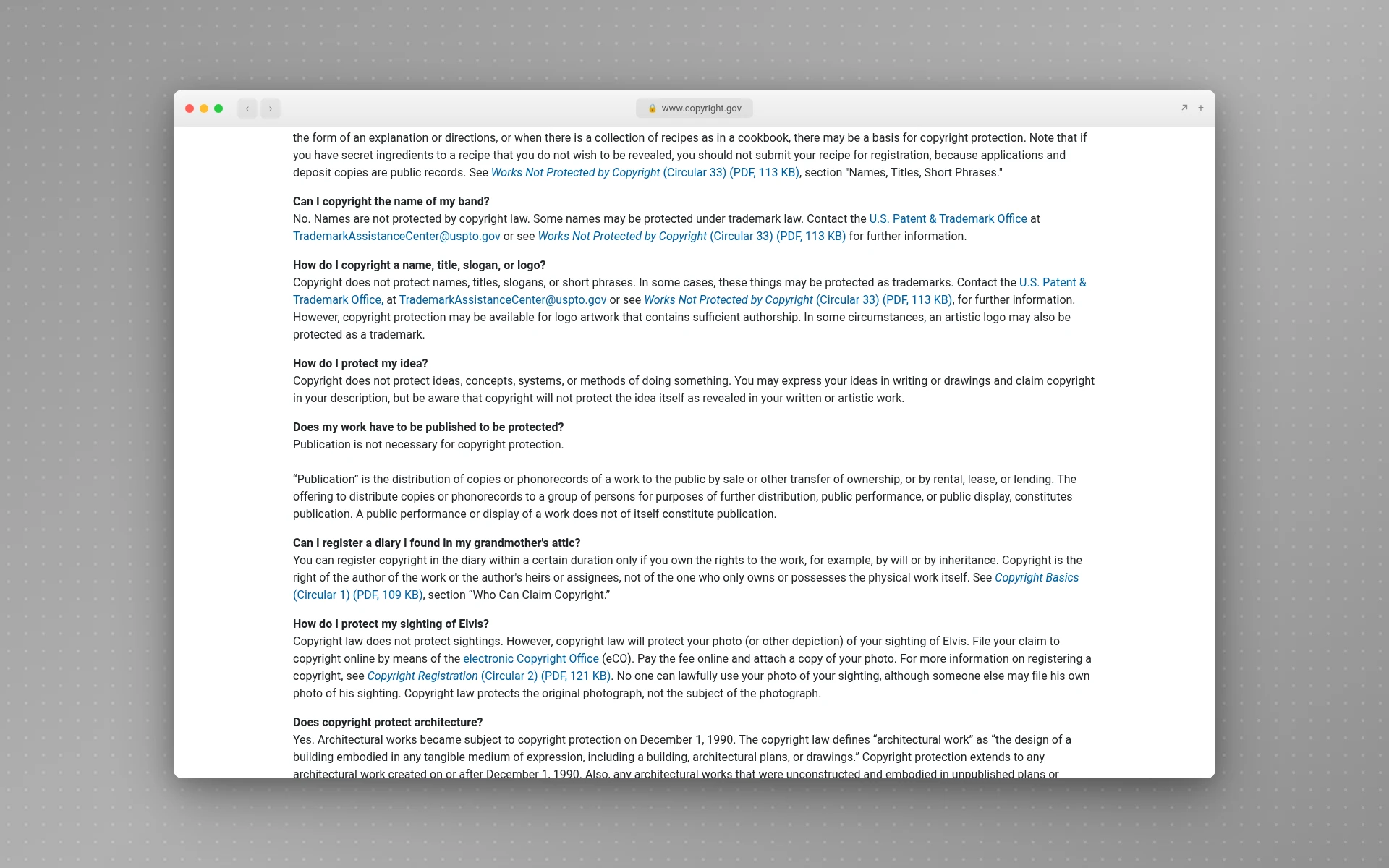
What doesn't count? The Office's overview of copyright lists "titles, names, short phrases, and slogans; familiar symbols or designs" among the things that aren't creative enough, and adds that "copyright protects expression, and never ideas." In logo terms, these alone won't get you a registration:
- Your business name, in any font
- A tagline or short slogan
- Basic shapes: a circle, a star, a plain arrow
- Typography choices and simple color swaps
- The idea behind the design, like "a leaf inside a letter"
This isn't theoretical. The Copyright Office refused to register the logo for the video game Cyberpunk 2077, and its Review Board upheld that refusal on May 27, 2020. According to the Copyright Alliance's write-up, the Board found the logo was built from a short phrase, a typeface with text effects and familiar geometric shapes, a "mere simplistic arrangement of non-protectable elements."
A quick self-test: cover up the words in your logo. If what's left is a custom illustration, an original character or a symbol you drew yourself, you probably have something to register. If what's left is a dot or nothing at all, copyright won't do much for you, and a trademark is the better filing. Plain wordmark logos almost always fall in that second group. (If you're unsure which part of your logo is the symbol, this explainer on what a logo mark is sorts it out.)
Step 2: Confirm You Own the Copyright
Whoever creates the artwork owns the copyright, unless the law or a contract says otherwise. That's the step people get wrong when they hired someone.
There are three common situations:
- You drew it yourself. You own it. Simple.
- An employee made it as part of their job. Under the Copyright Act's definition, that's a "work made for hire," and the employer owns it.
- A freelancer or agency made it. This is the tricky one. Commissioned work counts as made for hire only in nine specific categories listed in the law, and only with a signed written agreement. A standalone logo isn't one of those categories, so the freelancer usually owns the copyright until they transfer it.
That transfer has to be on paper. The law says a transfer of copyright ownership "is not valid unless" it is "in writing and signed by the owner of the rights conveyed." An invoice marked "paid" doesn't do it. If you don't have a signed assignment, ask your designer for one before you file.
The same goes for any fonts or stock elements in the design: you can't claim copyright in parts you didn't create. The logo fonts guide explains which font licenses allow commercial logo use.
Step 3: Pick the Right Application
The Copyright Office has two online applications that fit a logo, and the cheaper one has strict conditions. Per the fee page:
| Application | Fee | Who can use it |
|---|---|---|
| Single Application | $45 | "Single author, same claimant, one work, not for hire" |
| Standard Application | $65 | Everyone else, including companies and works made for hire |
| Paper filing (Form VA) | $125 | Anyone who can't or won't file online |
In practice:
- You designed the logo and you own it personally: Single Application.
- Your company owns it because an employee made it, or a freelancer assigned it to the company: Standard Application. The author and the owner (the "claimant") are different people, so the Single option doesn't apply.
- Several logo variations: each one is a separate work. The Office does offer group options, like a group of two-dimensional artworks, but read its rules before you rely on one.
Step 4: File Online and Upload Your Logo
You file through the Copyright Office's electronic registration system. Its visual arts registration page lists logos among the "Works Commonly Registered In This Category" and links straight to the online application.
The process looks like this:
- Create an account in the online registration system.
- Start a visual arts registration and choose the Single or Standard Application.
- Describe the work: its title (your logo's name works), when it was finished, and its publication details.
- Name the author and the claimant, and say whether it's a work made for hire.
- Limit the claim if needed. If your logo includes text, stock elements or AI-generated parts, say what you're not claiming, so the claim covers only your original art.
- Pay the fee and submit.
- Upload your logo file as the deposit copy.
Then you wait. The Office says electronic claims are processed fastest, and it publishes current processing times on its site. Claims that need back-and-forth with an examiner take longer, which is one more reason to get Step 1 and Step 2 right before you file.
Step 5: Add a Copyright Notice and Keep Records
You don't need a © on your logo for it to be protected. The Copyright Office's Circular 3 says a notice is optional for works published on or after March 1, 1989. It still helps: a proper notice tells people you claim the work, and it can block an infringer from claiming they didn't know.
A notice has three parts:
- The symbol ©, or the word "Copyright"
- The year of first publication
- The owner's name
So: © 2026 Bramble Studio LLC. Put this line in your website footer or brand guidelines rather than on the logo itself, which keeps the design clean.
Keep a folder with your original sketches, the dated working files, the designer's signed assignment and, once it arrives, the registration certificate. If anyone ever disputes who made the logo first, that folder is your evidence.
How Much Does It Cost to Copyright a Logo?
Copyrighting a logo with the US Copyright Office costs $45 with the Single Application or $65 with the Standard Application when you file online, and $125 on paper, per the Office's fee page as of November 19, 2026. There's no fee to own the copyright: it exists free from creation.
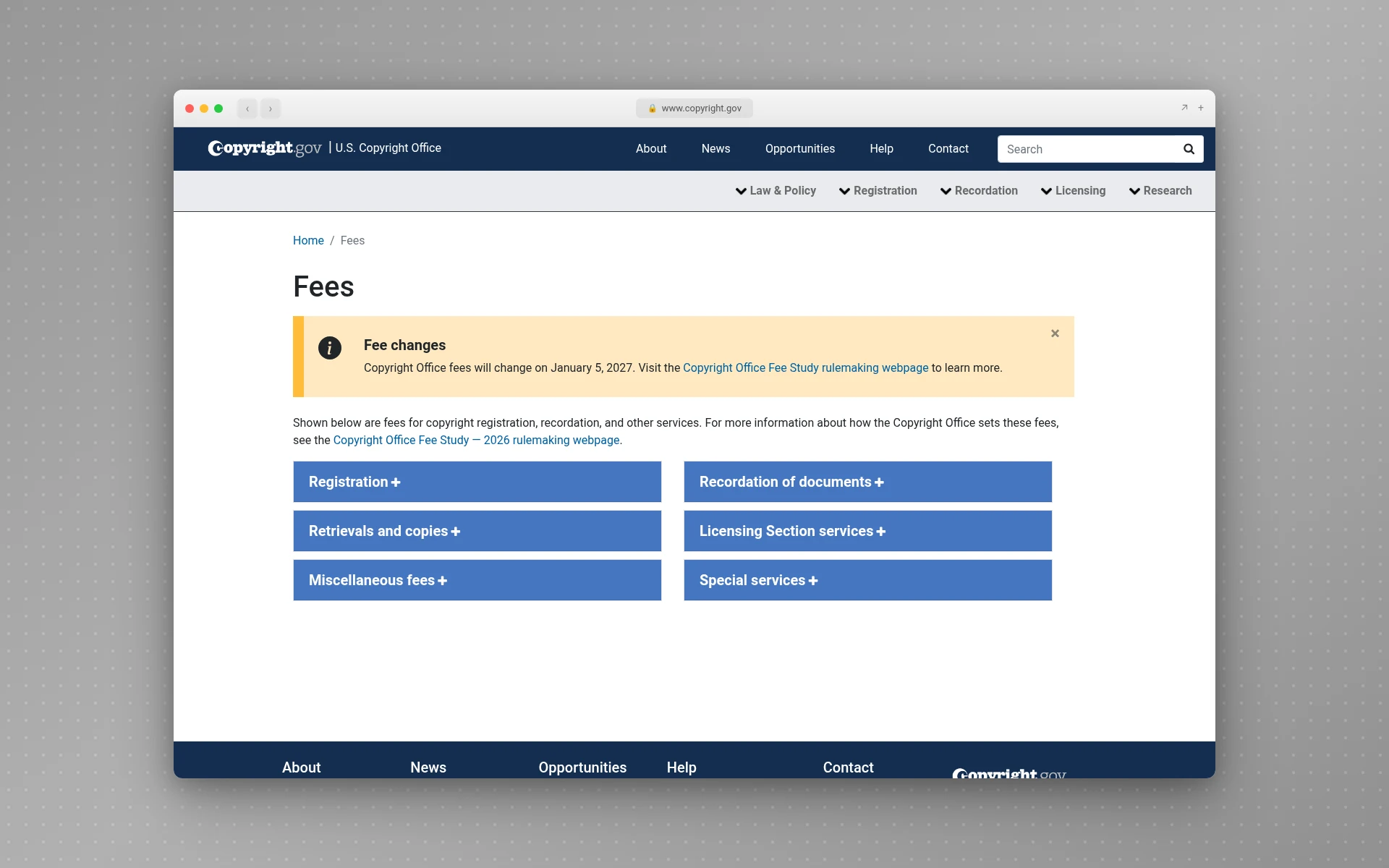
Those prices won't last much longer. On November 17, 2026, the Office announced a final rule setting a new fee schedule that takes effect on January 5, 2027. If you file after that date, check the fee page for the new amounts. If you're ready now, filing before January 5 means paying the current ones.
Compared with the other costs of a logo, copyright is the cheap part. A trademark filing starts at $350 per class at the USPTO, and this rundown of how much a logo costs covers the design side, from DIY to agencies.
Timing also has a money angle. Under 17 U.S.C. § 412, you generally can't claim statutory damages or attorney's fees for infringement that started before you registered, "unless such registration is made within three months after the first publication of the work." Registering early keeps those remedies on the table.
Can You Copyright an AI-Generated Logo?
Only the parts a person created. In January 2025, the Copyright Office concluded that AI outputs "can be protected by copyright only where a human author has determined sufficient expressive elements," and that writing prompts alone isn't enough (Copyright Office, January 29, 2025).
For a logo, that means:
- A logo straight out of an AI tool is unlikely to be registrable as is.
- A logo you substantially reworked by hand, redrawing the symbol or adding your own illustration, may be registrable for your changes.
- You have to disclose AI-generated material in the application and leave it out of your claim when it's more than minimal, per Jenner & Block's summary of the Office's 2023 registration guidance. The registration then covers only the human part.
None of this stops you from using an AI-made logo for your business. It just means a trademark is the protection that fits, since trademark rights come from using the mark in business, not from who drew it.
How to Make a Copyright Logo (the © Symbol)
When people search "how to make a copyright logo," they usually mean the © symbol itself. Here's how to type it:
- Windows: hold Alt and type 0169 on the number pad, per Microsoft's support page.
- Mac: open the Character Viewer from the Edit menu (Edit > Emoji & Symbols) and search for "copyright."
- HTML: write
©in your page's code.
Don't build the © into the logo artwork itself. It clutters the mark, it doesn't add protection, and it can confuse people who expect ® or ™ on a brand. Put the full notice in your footer instead.
Common Mistakes
- Trying to copyright the business name. Names and slogans are out of scope. That's a trademark job.
- Filing for a plain text logo. A name in a font plus a basic shape is the classic refusal.
- Assuming you own a freelancer's work because you paid. Without a signed transfer, you probably don't.
- Using the $45 Single Application for a company-owned logo. It only covers a single author who's also the owner, and not a work made for hire.
- Claiming AI-generated parts as your own. Disclose them and limit the claim.
- Putting ® on a logo you've only copyrighted. ® is for federally registered trademarks.
Pro Tips
- File both if your logo has a real symbol. Copyright covers the artwork, and a trademark covers its use as your brand.
- Get the assignment signed before the final files change hands. Designers are most responsive while the project is open.
- Register within three months of first publication to keep statutory damages available.
- Keep the design simple anyway. Simplicity hurts copyright a little, but it helps recognition and trademark searches a lot. The minimalist logos guide shows the balance.
- Watch the January 5, 2027 fee change if you're on the fence about filing.
Frequently Asked Questions
Is my logo automatically copyrighted?
Yes, if it contains original artwork. The Copyright Office says a work is protected "the moment it is created and fixed in a tangible form," so no filing is needed for the copyright to exist. What's automatic is only the art: the words in your logo, basic shapes and the overall idea aren't covered, and you'll still need to register before you can sue.
Can I copyright a logo myself?
Yes. The online application is built for individuals, and you don't need a lawyer to file. If you designed the logo and own it personally, the $45 Single Application usually fits. If your company owns it or a freelancer made it, use the $65 Standard Application and have the signed transfer ready.
Should I copyright or trademark my logo?
For most businesses, the trademark matters more, because it protects the name and the logo as signs of your business and stops competitors from using lookalikes. Copyright adds protection for the artwork itself, which is worth $45 to $65 if your logo has a custom illustration or symbol. Many brands do both. The guide to trademarking a logo walks through that filing.
How long does a logo copyright last?
For works created since 1978, copyright lasts for the author's life plus 70 years. If the logo is a work made for hire, such as one an employee made for the company, it lasts 95 years from publication or 120 years from creation, whichever ends first, per the Copyright Office.
Do I need to put © on my logo?
No. A copyright notice is optional for works published on or after March 1, 1989. It's still useful, because it tells people you claim the work and can defeat an "I didn't know" defense. Put "© year, owner name" in your website footer rather than in the logo.
Where to Go From Here
The short version: check that your logo has original art beyond the name, get a signed transfer from whoever made it, pick the $45 or $65 application, upload the file, and file before January 5, 2027 if you want today's fees. If your logo is mostly words, put your money into a trademark instead.
If you don't have a logo yet, LogoGen is one option: you describe your business, pick a style and colors, and it generates logo options, typically in under 10 seconds.